DailyWeather: Weather Forecast
SunnyTech LimitedWeather
4.0206.00 Reviews
- Version
- 3.7.7.0
- Installs
- 1.00M
- Age Rating
- Everyone
Screenshots
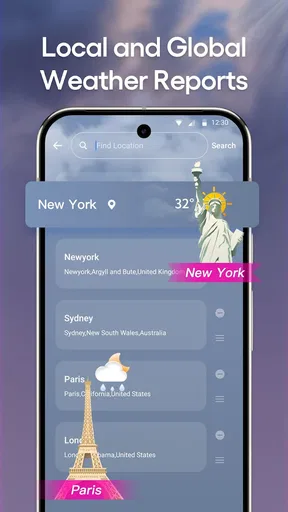
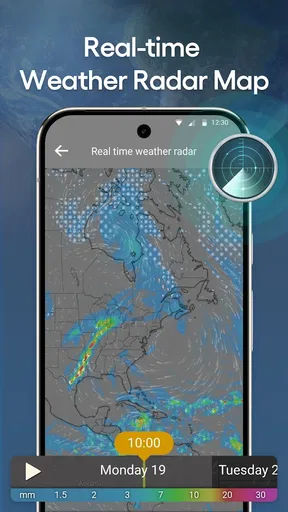
Our Review of DailyWeather: Weather Forecast
 Analysis by Appyee
I use a weather app most when I’m deciding what to do next, not when I’m trying to become a meteorologist. DailyWeather: Weather Forecast works best as a quick check before leaving home, followed by a closer look when the forecast could change my plans. That everyday rhythm suits this weather app from SunnyTech Limited: it brings several useful kinds of information together without asking me to turn a simple decision into a research project.
Building a useful daily weather routine
I find a weather routine works best when each check has a purpose: a quick glance for what to wear, then a more deliberate look when an outing depends on timing. In the next section, I’ll focus on how a few repeatable choices can make those checks more useful without turning the forecast into another distraction.
A quick check, then a closer look
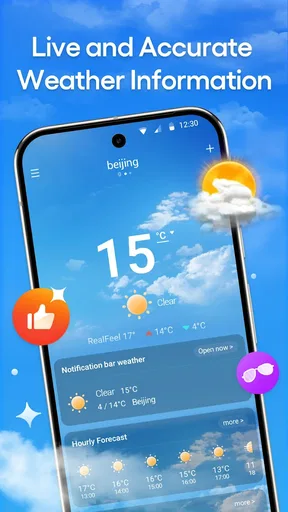
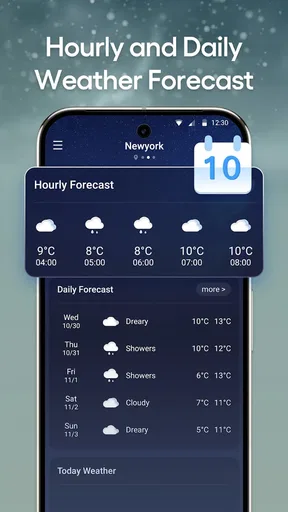
My baseline workflow is straightforward: glance at the current conditions, check the hourly forecast if I’ll be out for a while, and look at the wider forecast when planning ahead. The main screen is designed for a quick snapshot, while the hourly and weekly views let me answer different questions. Is a jacket sensible right now? Is rain likely to interfere with an evening walk? Those are more practical questions than simply asking whether the day will be sunny.
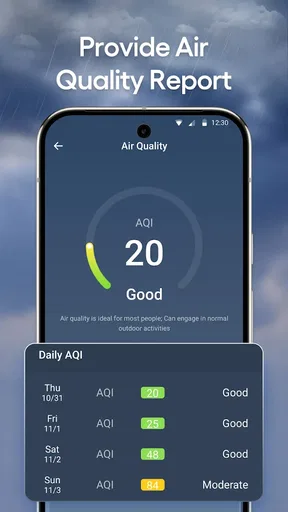
The app brings together temperature, precipitation, wind speed and UV information, so I can weigh several factors rather than relying on a single number. I find that especially useful when the temperature seems comfortable but wind may make a walk feel less pleasant, or when a clear-looking day still calls for sun protection. These details are most helpful when I check them in relation to the activity I have planned.
For a realistic morning, I might look at the current conditions before getting dressed, then check the hourly forecast before deciding whether to cycle, walk or take a different route. If the forecast suggests changing conditions, the radar map gives me another way to inspect the weather around my region. I treat it as context for a decision, not as a guarantee of exactly what will happen at my front door.
Settings and alerts worth considering
Alerts are most useful when they solve a specific problem. I would set them around weather that could genuinely affect my day, such as severe conditions, rather than turning on every notification and training myself to ignore them. If you live somewhere where storms can arrive quickly, that warning can be a worthwhile reason to keep the app installed. If your plans rarely change with the weather, a quiet routine of opening the forecast when needed may be less distracting.
Widgets offer a different kind of convenience: they put a weather glance on the home screen, so checking conditions need not become a separate task. I’d choose a style that makes the information I actually use easy to scan, rather than adding a widget just because there are options. A widget is particularly handy before commuting or taking children out, but it should complement a more detailed forecast when timing matters.
There is a small trade-off between convenience and attention. A widget can make weather information easier to notice, while alerts can interrupt whatever you are doing. I’d start with the simplest setup, use it for a few days, and add notifications only if I find myself repeatedly missing information that changes a decision. That approach keeps the app useful instead of noisy.
Faster patterns for busy days
Once I know where the main views are, I can make checks more repeatable: current conditions for an immediate choice, hourly details for a time-sensitive outing, and the weekly view for broad planning. That simple sequence avoids reopening the same screens without a purpose. It also helps me notice when a plan depends on a narrow window of better weather, rather than assuming the whole day will behave alike.
The radar is worth using selectively. I’d open it when the timing or movement of local weather could affect a walk or errand, then return to the forecast for the broader picture. Panning and zooming can help me understand what is happening across the region, but a radar display is more useful as a visual supplement than as a substitute for checking conditions and timing in the forecast.
For someone who likes a fast home-screen check, widgets may be the easiest habit to maintain. For someone who needs to compare several parts of the day, opening the app and looking at the hourly view is a better routine. Neither approach is automatically superior; the useful choice depends on whether you need a glance or a plan.
Where it fits—and where it may not
DailyWeather has a broad set of everyday tools, but I would not treat an attractive radar view or a notification as a promise that every local change will be captured at the exact moment I need it. For travel, outdoor work, or a safety-critical decision, I’d check the relevant official local guidance as well. Weather apps are decision aids, and the consequences of getting a forecast wrong matter more for some plans than others.
Compared with relying on a phone’s default weather view, this app gives me more ways to inspect conditions, including a radar map, widgets and alerts. Compared with a specialist weather service, though, its appeal is convenience rather than a reason to assume it offers every advanced tool a dedicated enthusiast might want. If you need detailed storm analysis or highly specialized planning, a service built for that purpose may be a better fit.
The app is free, rated for Everyone, and has reached over a million installs. Its average rating is 4.2 from around ten thousand ratings, which gives a prospective user some sense of its broad reception without telling them whether its particular layout will suit their habits. It was released on August 22, 2024, and version 3.7.1.0 supports Android 7.0 and later. Those details make it straightforward to assess whether it fits an older Android device, while the clean interface and quick-access options are the more important considerations in daily use.
Who will get the most from it
I’d recommend it to people who want a practical combination of current conditions, hourly and weekly forecasts, a regional radar view, widgets and severe-weather alerts. It makes sense if you often decide what to wear, when to leave, or whether to shift an outdoor plan based on the day’s conditions. SunnyTech Limited has put the emphasis on an approachable set of everyday tools rather than making the experience feel like a specialist dashboard.
I’d skip it if you only need an occasional temperature check and prefer not to add another app, or if your routine depends on highly specialized forecasting tools. It may also be the wrong choice if notifications tend to distract you; you can keep the experience calmer by relying on a manual check or a widget instead. Before committing to a habit, try the app’s main screen and forecast views and see whether their presentation answers your questions quickly.
A considered verdict
Ever found yourself glued to the window trying to guess if you should grab an umbrella or your sunglasses? Well, those days might be over thanks to DailyWeather: Weather Forecast. This nifty app is like having a weather station in your pocket, and I’ve got to say, it’s pretty impressive.
Alright, so you’re probably wondering what makes DailyWeather: Weather Forecast worth the download. For starters, it offers incredibly detailed forecasts. I’m talking about everything from temperature and precipitation to wind speed and UV index. You can finally plan your day without those pesky weather surprises.
Features That Stand Out
One of the coolest features is the real-time updates. The app refreshes faster than you can say “rain check,” ensuring you have the latest info. Plus, it’s got this sleek radar map that makes you feel like a meteorologist. Just pinch and zoom to see weather patterns across your region!
And if you’re like me and love a bit of customization, you’ll appreciate the widgets. You can choose from different styles and themes to match your phone’s vibe. It’s a small detail, but it really makes the app feel like it’s yours.
Usability and Interface
Navigating through the app is a breeze, no pun intended. The interface is clean and intuitive, with the main screen giving you a quick snapshot of the current weather. Tap around, and you’ll easily find hourly and weekly forecasts. Trust me, you won’t get lost.
Another thing I love is how lightweight the app is. It doesn’t hog your phone’s resources, so you can keep it running in the background without any worries. Battery life? Still intact!
Personalized Weather Alerts
DailyWeather doesn’t just stop at forecasts. It goes the extra mile with personalized weather alerts. You can set it up to notify you about severe weather conditions, which is super handy if you’re living in an area prone to sudden storms. It’s like having a personal weather assistant looking out for you.
Wrapping It Up
So, what’s the verdict? If you’re after a reliable, user-friendly weather app that’s packed with features, DailyWeather: Weather Forecast is a solid choice. It’s got everything you need to keep you ahead of the weather game, all wrapped up in a neat little package. Give it a whirl, and say goodbye to unexpected downpours!
My best advice is to make it part of a small, repeatable routine rather than checking it constantly: use the widget for a quick glance, open the hourly view when your schedule depends on timing, and consult the radar when regional conditions are relevant. That division of effort is what makes the combination of tools genuinely handy. For everyday decisions, I find it a capable companion; for specialized forecasting or situations where safety depends on precise local guidance, I’d pair it with a more appropriate source.
Verdict
Strengths of DailyWeather: Weather Forecast
- Accurate weather predictions.
- Easy-to-navigate interface.
- Customizable alerts.
- Supports multiple locations.
- Minimal ads for free version.
Limitations of DailyWeather: Weather Forecast
- Requires internet for updates.
- Limited offline features.
- No widget customization.
- Battery usage can be high.
- Premium version is costly.
Similar Picks in This Category
View All
Weather - By Xiaomi
Xiaomi Inc.4.1

Weather & Radar Forecast
WetterOnline4.8

Weather
OneLouder Apps4.6

AccuWeather: Weather Radar
AccuWeather3.6

The Weather Channel - Radar
The Weather Channel4.6

1Weather Forecasts & Radar
OneLouder Apps4.3
Frequently Asked Questions
What features does DailyWeather: Weather Forecast offer?
DailyWeather provides a comprehensive set of features, including real-time weather updates, hourly and weekly forecasts, and severe weather alerts. Additionally, it offers radar maps, weather widgets, and personalization options for different locations, ensuring you stay informed no matter where you are.
Is DailyWeather: Weather Forecast free to use?
DailyWeather offers a free version with basic features, but it also has a premium subscription. The premium version provides an ad-free experience, extended forecasts, and additional customization options, making it ideal for users who want more detailed weather insights.
How accurate are the weather forecasts in DailyWeather?
DailyWeather uses data from multiple reliable sources to provide accurate weather forecasts. It employs advanced algorithms to ensure the data is up-to-date and precise, although users should note that no weather app can guarantee 100% accuracy due to the unpredictable nature of weather.
Can I customize notifications in DailyWeather?
Yes, DailyWeather allows users to customize notifications, including setting alerts for specific weather conditions such as rain, snow, or extreme temperatures. You can also choose the frequency of updates to stay informed about changes in the weather without being overwhelmed by notifications.
Is DailyWeather compatible with both Android and iOS devices?
DailyWeather is available for both Android and iOS platforms, ensuring a seamless experience across devices. The app is optimized for various screen sizes and operating systems, providing a consistent and user-friendly interface whether you're using a smartphone or a tablet.
